Use case · ai video generator

ai video generator with socialAF.

Create more video content without rebuilding your character, voice, or visual style from scratch every time. socialAF is an AI video generator built for creators, agencies, and brand teams who need consistent AI characters across image, video, and voice. Start with a reference-driven character, generate multi-angle reference packs, produce stills, animate them into clips, add a talking avatar, and publish more variations in less time. Whether you are launching a virtual creator, testing ad concepts, building short-form social content, or producing client-ready campaign assets, socialAF helps you move from idea to usable video faster. Instead of juggling disconnected tools, you get one workflow for text-to-video, image-to-video, reference-to-video, talking avatars, text-to-speech, voice cloning, per-character galleries, agency multi-org workspaces, and bulk generation. The result is simple: you can build recognizable characters, keep campaigns visually aligned, create more content variations, and reduce the bottlenecks that slow creative production.

Get started today·Results in seconds·Loved by creators

Our library·13 characters·12 models

Mia, Beauty + soft glam
Nova, Fitness + wellness
Jordan, Strength coach
Aria, Style + fashion
Kai, Travel + adventure
Eli, Food + slow living
Sage, Yoga + breathwork
Reese, Gaming + tech

Proof·Built for high-output creative teams: 1 workspace for image, video, avatar, voice, and bulk generation; 3 core video workflows including text-to-video, image-to-video, and reference-to-video; per-character galleries to keep every asset organized; agency-ready multi-org workspaces for client separation; and a risk-free workflow designed so you can build consistent AI characters across image, video, and voice. Cancel anytime.

Why ai video generator

Built for the way creators actually work.

01

Launch recognizable AI characters that audiences remember

Use socialAF’s reference-driven character builder and multi-angle reference packs to create a repeatable visual identity for your videos. Your character can appear in product demos, short-form skits, UGC-style ads, educational clips, story scenes, and talking avatar content without losing the look that makes the brand memorable.

02

Produce more video concepts without slowing your team down

Turn scripts, reference images, product ideas, and campaign briefs into video variations using text-to-video, image-to-video, and reference-to-video workflows. With bulk generation, you can test hooks, scenes, captions, angles, and calls to action faster, helping you discover what earns attention before spending more on production.

03

Keep every campaign organized from first idea to final clip

Store generations inside per-character galleries, separate client projects with agency multi-org workspaces, and build a clean production system for creators, editors, strategists, and account teams. socialAF helps you reduce asset chaos while keeping videos, images, voices, and character references connected.

How it works

How ai video generator works.

socialAF gives you a guided AI video creation workflow that starts with your character and ends with ready-to-use content variations. You can create from a prompt, animate an image, use a reference, add a voice, or generate talking avatar clips for social posts, ads, explainers, and brand storytelling.

Alemap, Travel + slow living

01

Step 1: Build your reusable AI character

Upload references or describe the persona you want to create. Use the reference-driven character builder to define the look, style, audience, niche, and creative direction. Generate a multi-angle reference pack so your character can stay consistent across close-ups, full-body shots, lifestyle scenes, product moments, and avatar videos. Add voice cloning if you want the character to speak in a recognizable branded voice.

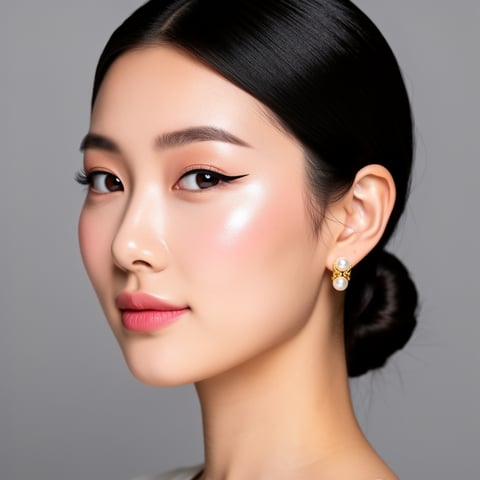
Mia, Beauty + soft glam

02

Step 2: Generate video scenes from text, images, or references

Choose the right workflow for the asset you need. Use text-to-video when you have a concept or script. Use image-to-video when you want to animate a still, product shot, or character portrait. Use reference-to-video when consistency matters across a campaign. You can create social clips, ad variations, character intros, product explainers, narrative scenes, or motion tests without starting from a blank canvas.

Nova, Fitness + wellness

03

Step 3: Add voice, organize assets, and scale variations

Use talking avatars and text-to-speech to bring your character’s message to life. Save the results in per-character galleries so your best images, clips, prompts, and voices stay easy to find. For agencies and teams, use multi-org workspaces to separate clients and bulk generation to create more hooks, formats, and creative tests from the same core idea.

Create your first AI character video today

Build consistent AI characters across image, video, and voice. Cancel anytime.

Try it Today

The difference

Why it wins for ai video generator.

Most AI video workflows break down when you need the same character, voice, and visual identity to appear across many assets. socialAF is built around consistency first, so every generation can support a larger creator brand, client campaign, or content system.

Without ai video generator

Traditional approach

With socialAF

Avoid the cost and scheduling friction of casting, locations, reshoots, studio time, and manual editing for every concept. socialAF lets you prototype scenes, test ideas, and create campaign variations before committing to expensive production.

Without ai video generator

Generic tools

With socialAF

Instead of creating disconnected one-off clips, socialAF connects character creation, image generation, video generation, talking avatars, voice cloning, and asset management in one workflow designed for repeatable output.

Without ai video generator

Manual methods

With socialAF

Reduce repetitive production tasks like recreating prompts, searching for old references, rebuilding character details, and organizing files across folders. Per-character galleries and bulk generation help your team move faster while staying consistent.

What creators say

Creators using socialAF for ai video generator.

socialAF changed how we pitch creative. We can show clients three character directions, multiple video hooks, and voice options before a shoot would have even been scheduled.

Maya Reynolds

Creative Director

The biggest win is consistency. Our AI persona now appears in images, short videos, and talking avatar posts without feeling like a different character every time.

Jordan Ellis

Creator Strategist

FAQ

Common questions about ai video generator.

What is the best AI video generator for consistent characters?

The best AI video generator for consistent characters is one that treats the character as the foundation of the workflow, not as a one-time prompt. socialAF is designed for that exact use case. You can create a persona with a reference-driven character builder, generate multi-angle reference packs, store outputs in per-character galleries, and reuse that character across image generation, text-to-video, image-to-video, reference-to-video, talking avatars, and voice workflows. This helps your audience recognize the same face, style, personality, and brand presence across repeated posts, ads, and campaigns.

Can I use socialAF as a text-to-video AI generator for social media?

Yes. You can use socialAF to turn scripts, hooks, scene ideas, product concepts, and campaign briefs into AI video content for social media. Text-to-video is useful when you want to move quickly from idea to motion, especially for short-form content, ad tests, creator posts, educational clips, and narrative scenes. For stronger consistency, you can pair text prompts with a saved character, reference pack, voice, and visual direction so your videos feel like part of the same content universe instead of isolated experiments.

How does image-to-video AI help creators and agencies make more content?

Image-to-video AI helps you turn a strong still image into a more engaging motion asset. With socialAF, you can generate a character portrait, product scene, campaign visual, or branded image, then animate it into video for social posts, paid ads, landing pages, or client previews. This is especially valuable when you already have a visual direction that works and want to create more motion variations from it. Instead of producing every frame manually, you can extend your best images into clips and test multiple creative angles faster.

Can I create talking avatar videos with cloned voices?

Yes. socialAF includes talking avatars, text-to-speech, and voice cloning capabilities so your AI character can deliver scripts, explain products, introduce offers, narrate stories, or appear in recurring social content. This is useful for creators who want a recognizable virtual host, agencies building spokesperson-style campaign assets, and brands that need scalable video without filming a person for every update. You can combine the avatar with saved character visuals and organized galleries to keep the presentation aligned across multiple videos.

Is socialAF useful for agencies managing multiple client video campaigns?

Yes. socialAF is built with agency workflows in mind. Multi-org workspaces help you separate client brands, character sets, campaign assets, and generation history. Per-character galleries keep references, images, videos, and voice assets organized so team members can quickly find what they need. Bulk generation helps agencies create more variations for testing hooks, offers, formats, and storylines. This gives your team a repeatable production system for client-ready AI video generation without mixing assets across accounts.

Do I need video editing experience to use an AI video generator like socialAF?

No advanced video editing experience is required to start creating with socialAF. The workflow is built around clear inputs: your character, your reference, your prompt, your image, or your script. You can start with a simple idea, generate visuals, create motion, add voice, and organize outputs without building an entire production pipeline yourself. Experienced creators and editors can still use socialAF for faster concepting, bulk variations, character consistency, and pre-production, while beginners can use it to create polished assets with less friction.

Ready to turn one character into a full video engine?

Start free →

Ready

Build your first character today.

Join creators using socialAF to bring their characters to life. One subscription, every model, no shoot required.

Start today