Skip to content
All guides
Reference6 min

Choosing the right model for the shot

A reference for picking the right image and video model when you have a specific shot in mind. Each example below is a model + prompt pair from the showcase.

Every model in the catalog has a personality. The ones that cost more aren’t universally better; they’re better at specific things. This guide sorts each family by the kind of shot they nail, so you stop guessing and start picking on purpose.

Each example shows the actual prompt + model used. Copy the structure, swap the subject, ship.

Step Image · 01

QWEN Image 2 Pro. Best identity lock

Default for any scene where keeping the face on-model matters more than anything else. QWEN Pro routes character references through qwen-image-2-edit automatically when refs are attached, and the result is the tightest identity lock in the catalog. Photoreal, natural skin, holds across wildly different contexts.

Use it for: lifestyle, fitness, food, travel, anything photoreal. 2 cr per generation, fast.
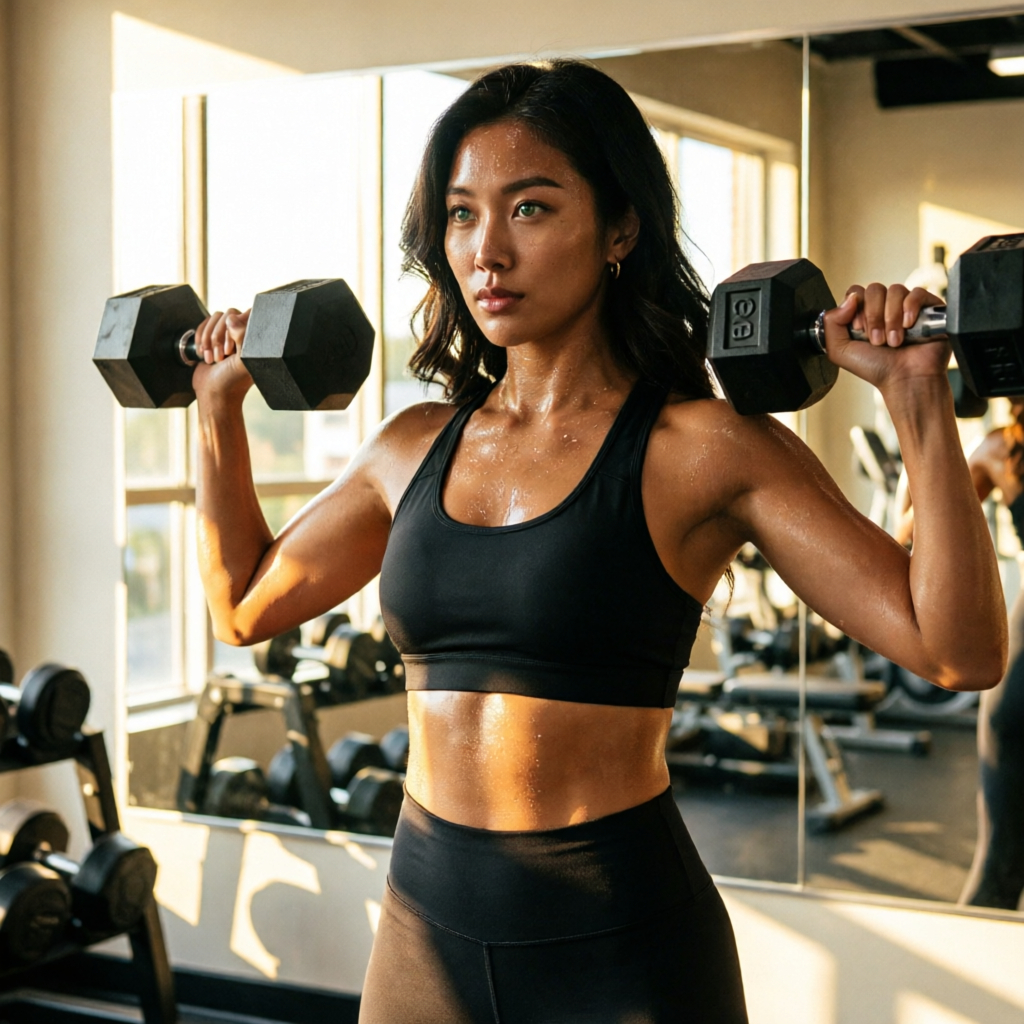
Gym, morning light
qwen-image-2.0-pro4:5Gym, morning light

Prompt

the same woman in matte black sports bra and high-waist leggings, mid-rep on a dumbbell shoulder press, gym mirror behind her catching golden window light, sweat sheen, focused expression, photoreal commercial fitness shot, 35mm
Step Image · 02

Flux 2 Pro. Editorial light + sharper textures

Flux 2 Pro reads scenes more like a photographer reads light. Cleaner editorial framing, sharper hair and fabric texture, more deliberate background separation. Identity lock is slightly looser than QWEN Pro. Fine for editorial where the styling carries the shot.

Use it for: studio, runway, beauty campaign, anything that needs Vogue-quality light. 1.5 cr per generation.

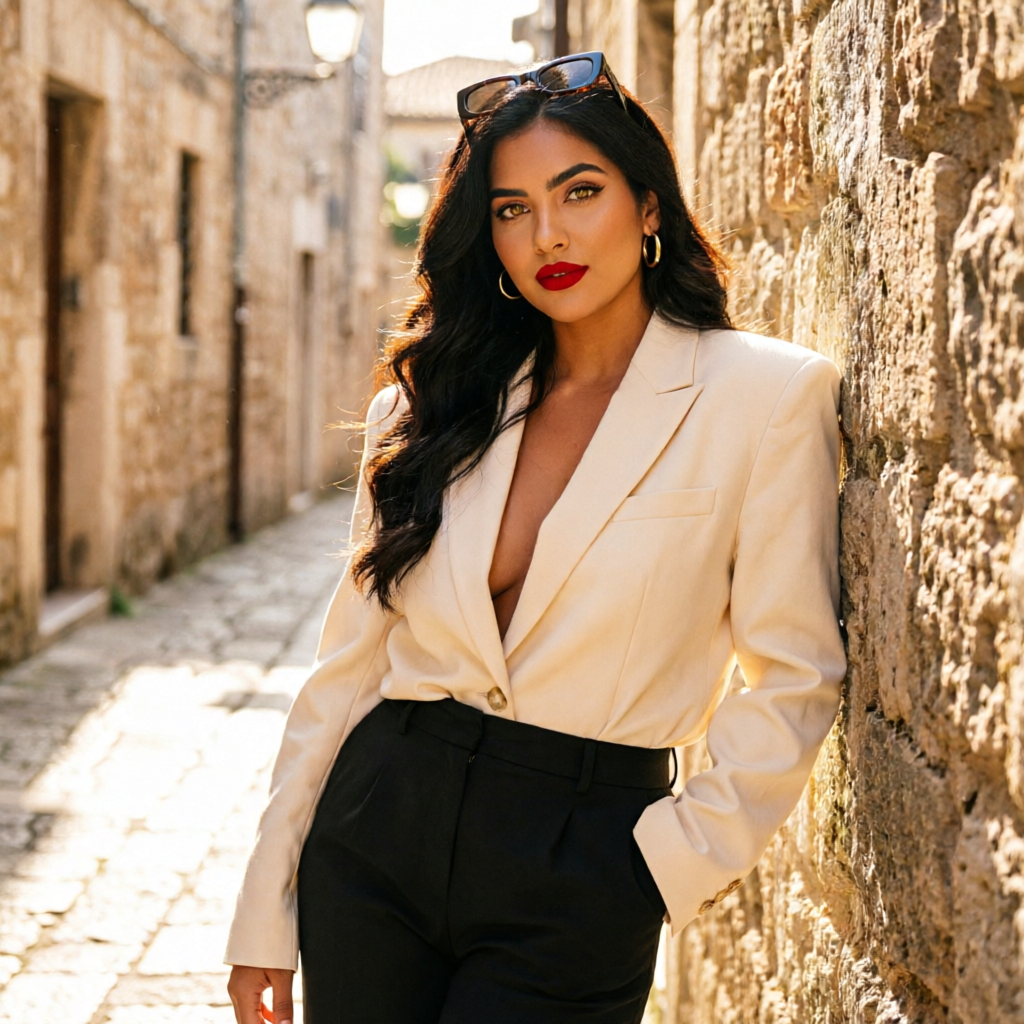
Tailored shoot, alley
qwen-image-2.0-pro9:16Tailored shoot, alley

Prompt

the same woman in an oversized cream blazer and black trousers in a sunlit narrow stone alley, leaning against a wall, sunglasses pushed up, photoreal high-fashion street editorial, 50mm

Step Image · 03

Nano Banana 2. Multi-reference compositing

Google’s SOTA model. Up to 14 reference images accepted on a single call, which means you can combine a character with an outfit reference, a location reference, and a lighting reference all at once. Best when the shot needs the character placed into a very specific scene.

Use it for: branded shoots, product placements, cosplay/aesthetic mashups. 3 cr per generation.

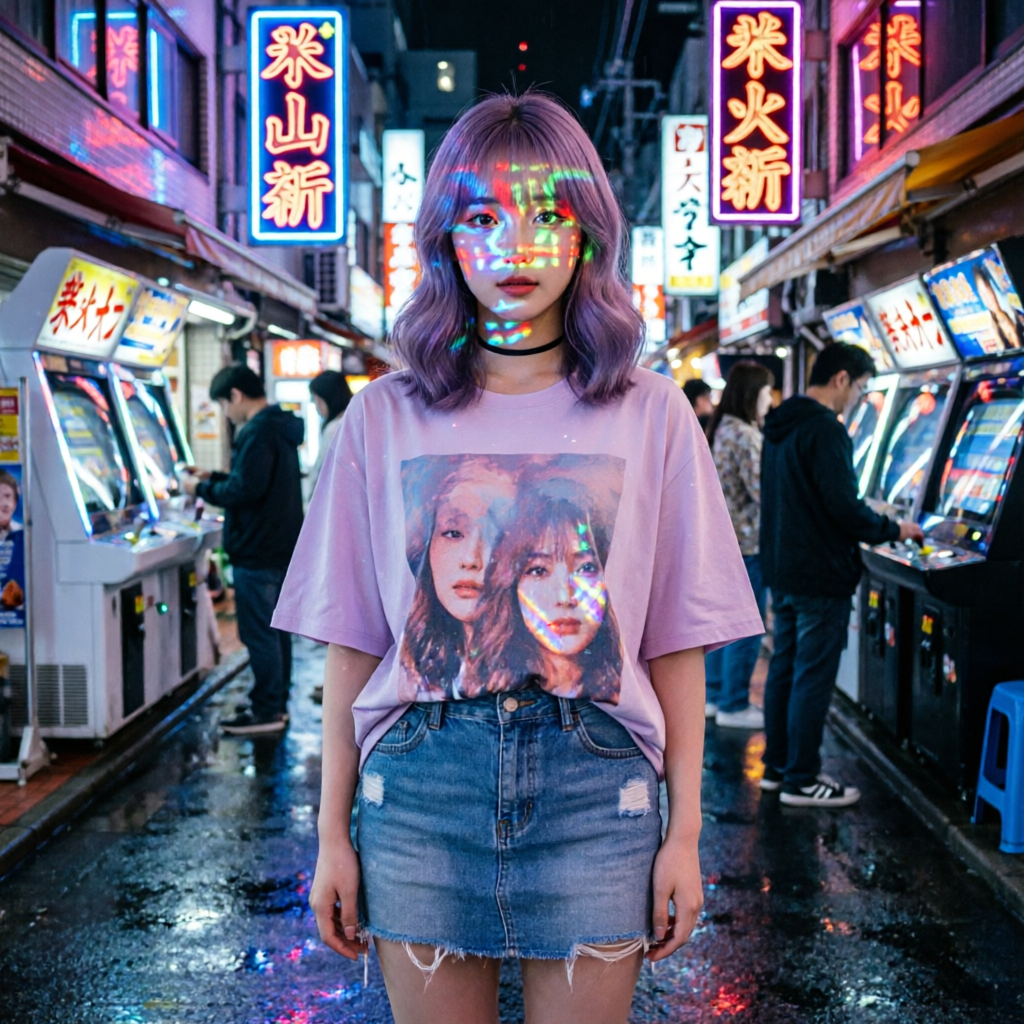
Tokyo arcade neon
qwen-image-2.0-pro9:16Tokyo arcade neon

Prompt

the same woman in a Tokyo arcade at night, neon kanji signs reflecting on her face, oversized graphic tee, mini skirt, photoreal cinematic urban portrait

Step Image · 04

Wan 2.7. Value tier with strong consistency

Best quality-per-credit in the image catalog. Slightly softer than QWEN or Flux on fine detail but holds identity well and renders quickly. Solid for batch volume work or drafts before paying for a Pro tier.

Use it for: high-volume content production, drafts, social-feed sized output. 1 cr per generation.

Sun salutation
qwen-image-2.0-pro16:9Sun salutation

Prompt

the same woman in upward-facing dog on a cork yoga mat in a sunlit wooden studio with potted plants, soft pink and gold morning light, photoreal wellness photography

Step Video · 01

Wan 2.7 t2v. Every showcase video

Best quality-per-credit on the video side too. With character refs attached, the studio routes through wan-reference-to-video so the face holds. Default for drafting clips and for production runs where you want to ship fast.

3 cr per second.

wan-reference-to-video16:9Cliff jump, slow-mo

Prompt

the same man jumping from a coastal cliff into turquoise ocean, slow motion drop, splash on entry, photoreal adventure sports

Step Video · 02

Kling 3 Pro. Cinematic with native audio

When the clip needs to feel like a film cut and benefits from native audio (footstep, ambient), reach for Kling 3 Pro. Reference-to-video sibling preserves identity through a dedicated kling-reference-to-video endpoint. 8 cr per second.

Step Video · 03

Veo 3.1 Standard. Hero-shot tier

Google Veo. Top-tier prompt adherence, motion realism, physics. Use it when the clip is going on a paid ad, a hero landing-page placement, or anywhere quality matters more than render time or cost. Standard is 8 cr per second; Fast is 3 cr/s when you want a draft pass before paying for the keeper.

wan-reference-to-video16:9Slow dolly, gym mirror

Prompt

the same woman performing a single dumbbell row, slow camera dolly-in, gym mirror catching warm window light, sweat detail, cinematic 35mm

Step Video · 04

Seedance 2 High. Stylized motion + sports

ByteDance Seedance 2 at 1080p. Strong with stylized motion, dance, sports, parkour. Reference-to-video routes through seedance-2-reference. 4 cr per second.

Step Video · 05

Happy Horse 1.0. Newest, fast, cheap drafts

Pixeldojo’s newest video family. 4 cr/s with t2v, i2v, and r2v variants. Use for drafting before paying for Veo or Kling Pro on the keeper.

Step Decision rules

Quick rules of thumb

  • Identity matters most → QWEN Pro (image) or Wan 2.7 with refs (video).
  • Editorial styling matters most → Flux 2 Pro (image) or Veo 3.1 (video).
  • Combining multiple references → Nano Banana 2 (image, up to 14 refs).
  • Drafting fast and cheap → Wan 2.7 (image or video) or Happy Horse 1.0 (video).
  • Paid placements / hero shots → Veo 3.1 Standard for video, QWEN Pro or Flux 2 Max for image.

Pick on purpose, not by default. The credits you save on drafts fund the renders that ship.

Now go build.

The whole pipeline is in your dashboard. Start with a character, ship every format from there.