Use case · AI face generator

AI Face Generator: Make a Face You Can Reuse

A generated face is only valuable if you can use it twice. We generated a clean headshot and then reused the same identity to prove it carries.

socialAF research pipeline·Generated June 1, 2026

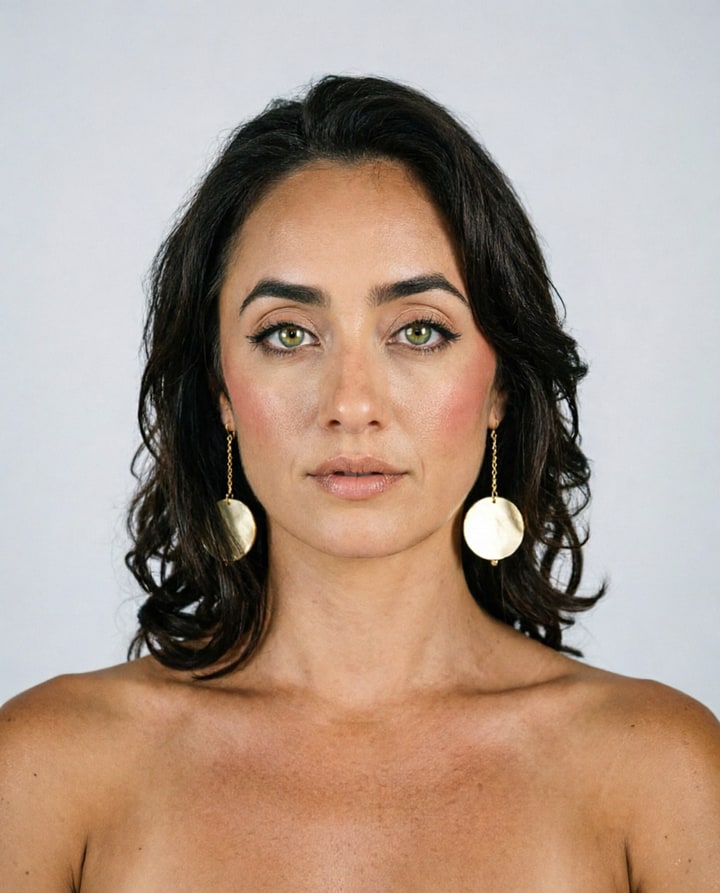
Clean AI-generated studio headshot of a character on a neutral grey backdrop
Generated in socialAF with the Nova character. qwen-image-2.0-pro, 2 credits.

What we ran

A neutral studio headshot generated at 2 credits became a reusable saved-character face that reappeared, recognizably, across the rest of our test set.

We generated an ID-style headshot on a neutral backdrop, the kind of clean face a creator would lock in as a base. Because it referenced the saved character, the same face then showed up in lifestyle, product, and presenter scenes without re-rolling.

How to reproduce·Re-run generate_image with the saved Nova character (5 reference images) on the stated model. Prompt gist: clean studio headshot of the saved character on a neutral backdrop, 4:5

The problem with a one-off face

Random face generators are everywhere and almost all of them produce a face you can never see again. For content that is a dead end. You cannot build a brand around a face that does not persist.

The useful question is not "can you make a face" but "can you make a face and then keep it."

Generating a reusable base face

We generated a clean, ID-style headshot on a neutral backdrop, the kind of base face you would lock in before building a persona. It came back at 2 credits on the character model.

Then we treated it as a saved character and generated other scenes to test whether the face survived the jump.

Did the face survive the jump

The face carried. The same person appeared in lifestyle, product, and presenter frames without us re-describing the features. That is the whole value of a face generator that is built around saved characters rather than one-shot rolls.

The neutral headshot also doubles as a profile photo and a reference for future generations.

Verdict

Generate neutral first, then save

Generate the face on a neutral backdrop first, then save it as a character. A clean base face references better than one shot in a busy scene.

Once saved, the face becomes infrastructure: every later image, video, and voice clip can use it.

FAQ

Common questions about AI face generator.

Can I reuse a generated face?

Yes, if you save it as a character. Our generated headshot then reappeared across lifestyle, product, and presenter scenes as the same person.

What is the best base shot for a face?

A clean, evenly lit headshot on a neutral backdrop. It references more reliably than a face shot in a busy or dim scene.

How much does a face cost to generate?

Our headshot was 2 credits on the standard character model.

Can the face talk?

Yes. The same face can drive a lip-synced talking-head clip, which we tested separately.

Are AI-generated faces based on real people?

No. A generated face is a synthetic composite, not a specific real person, and prompts that target a named individual are blocked.

Can I use an AI-generated face commercially?

A synthetic face you generate and save as a character is yours to use in content. Avoid prompting for a real person's likeness, which raises rights issues.

Build your character once. Reuse it everywhere.

Start free

Ready

Build your first character today.

Join creators using socialAF to bring their characters to life. One subscription, every model, no shoot required.

Start today