Use case · picture quality enhancer

picture quality enhancer with socialAF.

Turn weak, blurry, inconsistent, or low-resolution visuals into polished content your audience actually stops to watch. socialAF is a picture quality enhancer built for creators, agencies, and brands that need more than a one-off sharper image. You can transform rough references into consistent AI characters, generate cleaner image variations, create multi-angle reference packs, and carry the same persona into video, talking avatars, and voice. Modern picture quality enhancer workflows often focus on upscaling, denoising, sharpening, color correction, and face-aware restoration, but creators increasingly need those improvements to support repeatable content systems, not isolated edits. socialAF helps you move from a single imperfect picture to a reusable character asset library that supports campaigns, reels, ads, thumbnails, product explainers, short-form series, and client deliverables. Upload or build from references, refine the look with image-to-image and text-to-image generation, organize outputs in per-character galleries, then scale production with bulk generation and agency multi-org workspaces. The result is a faster path from messy source material to high-quality visuals that look intentional, branded, and consistent across every post.

Get started today·Results in seconds·Loved by creators

Our library·13 characters·12 models

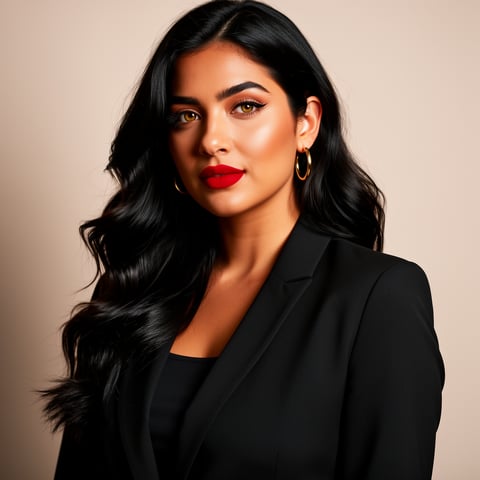
Mia, Beauty + soft glam
Nova, Fitness + wellness
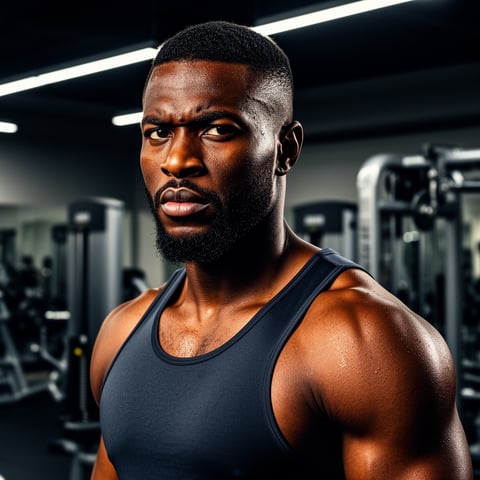
Jordan, Strength coach
Aria, Style + fashion
Kai, Travel + adventure
Eli, Food + slow living
Sage, Yoga + breathwork
Reese, Gaming + tech

Proof·Trusted by creator teams, solo producers, and agency operators who need repeatable AI content systems: create character references, generate image and video assets, organize per-character galleries, and scale client production from one workspace. Users choose socialAF when they want fewer disconnected tools, faster content turnaround, and a consistent AI persona that can appear in images, videos, talking avatars, and voice-driven content.

Why picture quality enhancer

Built for the way creators actually work.

01

Create Sharper Character Visuals That Look Campaign-Ready

Improve the perceived quality of low-resolution, soft, or inconsistent pictures by rebuilding them into clean AI character visuals. Use reference-driven character creation to preserve the look you want, then generate polished images for social posts, ads, thumbnails, creator packs, pitch decks, and brand campaigns.

02

Turn One Good Look Into a Full Content System

A normal picture quality enhancer stops after one export. socialAF helps you turn an improved character look into multi-angle reference packs, per-character galleries, image variations, video scenes, talking avatars, and text-to-speech assets so your persona can show up consistently everywhere.

03

Scale High-Quality Outputs Without Rebuilding From Scratch

Save time on repetitive editing and inconsistent manual prompts. With bulk generation, agency multi-org workspaces, and organized character galleries, you can produce more client-ready assets while keeping each AI character aligned with the original visual identity.

How it works

How picture quality enhancer works.

socialAF makes picture quality enhancement practical for real creator workflows. Instead of only sharpening a single upload, you can use your reference image to build a consistent AI character, generate better-quality visuals, and reuse that character across formats.

Jordan, Strength coach

01

Step 1: Start With Your Best Reference Image

Upload a portrait, product-style character shot, avatar concept, sketch, or existing AI image. Choose the clearest source you have, even if it is low resolution, slightly blurry, poorly lit, or inconsistent. socialAF’s reference-driven character builder helps you define the core look so the enhanced result feels connected to your original idea instead of becoming a random new face or style.

Aria, Style + fashion

02

Step 2: Generate Cleaner, More Consistent Image Variations

Use image-to-image and text-to-image generation to refine the character’s face, clothing, lighting, pose, background, and overall visual quality. Create multi-angle reference packs so your character can be seen from different perspectives while staying recognizable. Save your best outputs into a per-character gallery so every future asset starts from a stronger, more polished foundation.

Kai, Travel + adventure

03

Step 3: Expand the Enhanced Character Into Video and Voice

Once the picture quality is strong, move beyond static images. Generate video from text, image, or reference assets, create talking avatars, add text-to-speech, or use voice cloning to build a complete persona. Agencies can organize multiple client brands with multi-org workspaces and use bulk generation to produce campaign-ready variations faster.

Enhance Your Pictures Into Reusable AI Characters

Build consistent AI characters across image, video, and voice. Cancel anytime.

Try it Today

The difference

Why it wins for picture quality enhancer.

Most picture quality enhancer workflows improve one file and then leave you to manage everything else manually. socialAF is built for creators and agencies that need quality, consistency, and production speed in the same place.

Without picture quality enhancer

Traditional approach

With socialAF

Manual retouching can improve a picture, but it often takes too long to create enough variations for daily content. socialAF helps you rebuild the visual into a reusable AI character and generate multiple polished outputs for different campaigns.

Without picture quality enhancer

Generic tools

With socialAF

Basic enhancement tools may sharpen or upscale an image, but they do not preserve a character system across images, videos, avatars, and voice. socialAF connects picture improvement with character creation, galleries, video generation, talking avatars, and text-to-speech.

Without picture quality enhancer

Manual methods

With socialAF

Copying settings, prompts, folders, and references by hand creates drift. socialAF keeps your enhanced character assets organized by persona, supports multi-angle reference packs, and gives agencies multi-org workspaces for cleaner client production.

What creators say

Creators using socialAF for picture quality enhancer.

We started with a rough avatar concept and turned it into a complete character library. The biggest win was consistency: the same persona worked across thumbnails, short videos, and talking avatar clips without our team rebuilding the look every time.

Maya Chen

Creative Director

Our agency needed a faster way to polish character visuals for multiple client campaigns. socialAF helped us move from one low-quality reference to organized image sets, video concepts, and voice-ready assets in one workflow.

Jordan Ellis

Agency Content Strategist

FAQ

Common questions about picture quality enhancer.

What is a picture quality enhancer for AI character content?

A picture quality enhancer improves the perceived quality of an image by making it cleaner, sharper, more detailed, better lit, or more visually consistent. For AI character content, the goal is bigger than fixing one image. You need a strong visual identity that can be reused across posts, videos, avatars, and campaigns. socialAF helps you take an imperfect picture or reference and turn it into a consistent AI character system with image generation, multi-angle reference packs, per-character galleries, video generation, talking avatars, text-to-speech, and voice cloning.

Can I enhance picture quality from a blurry or low-resolution reference?

Yes, you can start with a blurry, soft, or low-resolution reference as long as it provides enough information about the character’s look. socialAF lets you use that reference as a creative starting point, then generate cleaner image variations through image-to-image and text-to-image workflows. For best results, choose the clearest source you have, describe the improvements you want, and save the strongest outputs into your character gallery so future generations begin from a higher-quality visual foundation.

How does socialAF help keep an enhanced character consistent?

Consistency is where socialAF is especially useful. Instead of enhancing one image and losing the look later, you can build a reference-driven character, generate multi-angle reference packs, and store approved outputs in a per-character gallery. That means your AI persona can maintain the same face, style, wardrobe direction, and brand presence across static images, video scenes, talking avatars, and voice content. This is valuable for creators building recurring characters and agencies managing multiple client personas.

Is socialAF only for enhancing photos, or can it create new visuals too?

socialAF can support both improvement and creation workflows. You can use an existing image as a reference, generate cleaner variations with image-to-image, create new scenes with text-to-image, and then expand the same character into video using text-to-video, image-to-video, or reference-to-video generation. You can also create talking avatars, add text-to-speech, and use voice cloning, giving you a complete content pipeline instead of a single photo export.

Why should agencies use a picture quality enhancer inside socialAF?

Agencies need speed, consistency, and organization. A standalone enhancer can create a better picture, but it usually does not solve client management, asset reuse, or campaign scaling. socialAF includes agency multi-org workspaces, per-character galleries, and bulk generation so teams can manage multiple brands, keep approved character references separated, and create large batches of high-quality image or video assets. This reduces production friction and helps your team deliver more polished creative without constantly starting over.

Can I use enhanced AI character images for social media campaigns?

Yes. socialAF is designed for creators and teams producing social-first content. You can create polished character images for profile assets, thumbnails, feed posts, ad concepts, story visuals, creator packs, and short-form video campaigns. Once your picture quality is improved and your character identity is defined, you can generate multiple scenes, expressions, outfits, angles, and formats while keeping the persona recognizable. Always make sure your final use follows your brand guidelines, platform rules, and rights requirements for any source material you upload.

Ready to turn better pictures into better content?

Start free →

Ready

Build your first character today.

Join creators using socialAF to bring their characters to life. One subscription, every model, no shoot required.

Start today