Use case · ai enhance image

ai enhance image with socialAF.

Turn average visuals into brand-ready assets with socialAF’s AI enhance image workflow. Whether you are fixing a blurry portrait, upgrading a character reference, refreshing campaign visuals, or preparing an image for short-form video, socialAF helps you move from rough idea to polished content faster. You can sharpen details, improve composition, generate higher-quality variations, and keep your character identity consistent across every output. For creators, agencies, and social teams, image enhancement is no longer just about making one picture look better. The latest creative workflows combine image improvement, image-to-image generation, image-to-video, talking avatars, and voice so a single strong visual can become an entire content system. Recent industry coverage shows creator teams increasingly prefer multi-model workflows that connect image, video, voice, avatar, and editing steps in one production process. ([pctechmag.com](https://pctechmag.com/2026/05/from-image-to-video-to-ai-avatars-how-multi-model-ai-video-workflows-are-evolving-in-2026/?utm_source=openai)) socialAF is built for that outcome. Upload a reference, enhance the look, generate multi-angle reference packs, organize everything in per-character galleries, and then expand your best image into videos, talking avatar posts, product scenes, ad concepts, and text-to-speech content. Instead of starting over every time you need a new post, you build one reliable visual identity and reuse it everywhere. Use socialAF to enhance AI character images, creator headshots, lifestyle visuals, product-led scenes, campaign mockups, social thumbnails, and reference images that need to look sharper, more consistent, and more professional. You get the creative lift of an AI image enhancer plus the workflow power to turn enhanced images into repeatable content.

Get started today·Results in seconds·Loved by creators

Our library·13 characters·12 models

Mia, Beauty + soft glam
Nova, Fitness + wellness
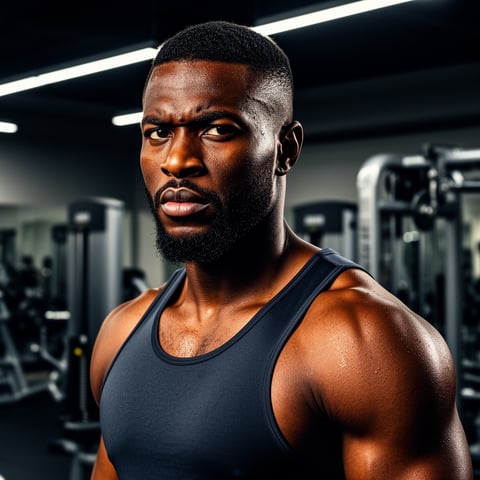
Jordan, Strength coach
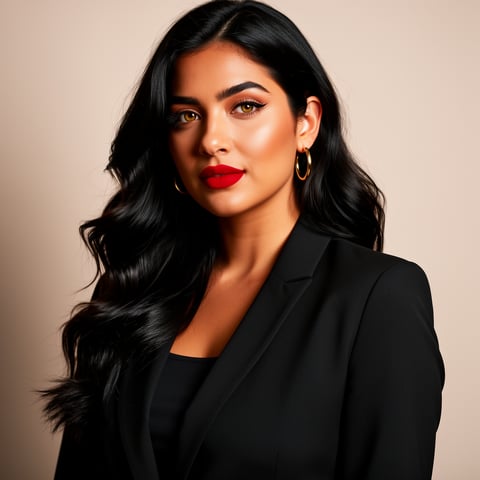
Aria, Style + fashion
Kai, Travel + adventure
Eli, Food + slow living
Sage, Yoga + breathwork
Reese, Gaming + tech

Proof·Built for creator and agency workflows that need speed, consistency, and reuse. Create character references, enhance images, generate bulk variations, organize per-character galleries, and move directly into image, video, talking avatar, and voice workflows. Teams can build consistent AI characters across image, video, and voice, with multi-org workspaces for agency production and the flexibility to cancel anytime.

Why ai enhance image

Built for the way creators actually work.

01

Make Every Image Look Campaign-Ready

Upgrade low-impact visuals into polished assets you can use for social posts, thumbnails, ads, landing pages, creator portfolios, and brand campaigns. socialAF helps you improve the image, refine the character, and generate stronger variations without booking a reshoot or rebuilding from scratch.

02

Turn One Enhanced Image Into More Content

Your best image should not stop at one post. With socialAF, you can use enhanced visuals as references for image-to-image generation, image-to-video clips, talking avatars, and text-to-speech content. That means one strong character image can become a full week of on-brand creative.

03

Keep Characters Consistent Across Every Output

Avoid the biggest frustration in AI content: characters that change from image to image. socialAF’s reference-driven character builder, multi-angle reference packs, and per-character galleries help you maintain a recognizable persona across enhanced images, videos, avatars, and voice-led assets.

How it works

How ai enhance image works.

Enhancing an image with socialAF is designed to feel like a creator workflow, not a technical editing project. Start with your image or character reference, guide the look you want, then reuse the enhanced result across the rest of your content pipeline.

Jordan, Strength coach

01

Step 1: Upload Your Image or Character Reference

Start with a portrait, AI-generated image, creator photo, product scene, or rough character concept. Add a short description of the outcome you want, such as sharper facial detail, cleaner lighting, more premium styling, stronger social thumbnail contrast, or a consistent character look. If you are building a persona, save the image into a per-character gallery so every future generation has a reliable visual anchor.

Aria, Style + fashion

02

Step 2: Enhance, Refine, and Generate Stronger Variations

Use socialAF’s image generation tools to improve the visual through image-to-image and text-to-image prompts. You can create cleaner versions, test different poses, adjust wardrobe, improve backgrounds, and build multi-angle reference packs for the same character. This step helps you choose the image that best matches your brand, campaign, or creator persona before you scale production.

Kai, Travel + adventure

03

Step 3: Reuse the Enhanced Image Across Video, Avatar, and Voice

Once your image is polished, turn it into more content. Generate video with text-to-video, image-to-video, or reference-to-video workflows. Create a talking avatar from the enhanced character image, add text-to-speech, or pair the persona with voice cloning for a more recognizable brand presence. Agencies can organize projects in multi-org workspaces and use bulk generation to produce campaign variations quickly.

Enhance Your First Image With AI Today

Build consistent AI characters across image, video, and voice. Cancel anytime.

Try it Today

The difference

Why it wins for ai enhance image.

Most image enhancement workflows stop after one improved file. socialAF goes further by helping you turn that enhanced image into a reusable character, campaign asset, and multi-format content engine.

Without ai enhance image

Traditional approach

With socialAF

Instead of coordinating photographers, retouchers, editors, and voice talent for every new asset, you can enhance a reference image once and extend it into images, videos, avatars, and voice-led content from one workflow.

Without ai enhance image

Generic tools

With socialAF

Generic image enhancers may improve sharpness, but they do not help you preserve persona consistency. socialAF connects enhancement with reference-driven character creation, multi-angle packs, and per-character galleries.

Without ai enhance image

Manual methods

With socialAF

Manual editing is slow when you need dozens of variations. socialAF supports bulk generation and agency multi-org workspaces, making it easier to produce multiple campaign-ready assets without repetitive file handoffs.

What creators say

Creators using socialAF for ai enhance image.

We started using socialAF to clean up character images, but the real win was turning those enhanced references into avatar clips and ad variations. Our content calendar became much easier to fill.

Maya R.

Creative Director

The per-character galleries changed how we produce creator assets. Once we enhance a look, our team can keep the same persona consistent across thumbnails, short videos, and voiceover content.

Jordan Lee

Social Content Strategist

FAQ

Common questions about ai enhance image.

What is the best way to use an AI enhance image tool for creator content?

The best way is to treat image enhancement as the first step in a larger content workflow. Start by uploading the image you want to improve, then describe the outcome clearly: sharper face detail, cleaner lighting, stronger social contrast, more premium styling, or a consistent AI character look. In socialAF, you can then save the enhanced image to a per-character gallery, generate multi-angle reference packs, and reuse the result for image-to-image, image-to-video, talking avatar, and text-to-speech content. This helps you get more value from every image instead of creating a one-off edit.

Can I enhance AI character images and keep the same identity?

Yes. socialAF is designed for consistent AI character creation, which makes it especially useful when you need the same persona to appear across multiple images, videos, and avatar clips. You can use the reference-driven character builder to guide the identity, create multi-angle reference packs, and store outputs in per-character galleries. This reduces the risk of your character looking different every time you generate a new asset. For creators and agencies, that consistency can make an AI persona feel more recognizable, trustworthy, and brand-ready.

Can socialAF turn an enhanced image into AI video or a talking avatar?

Yes. After you enhance an image, socialAF lets you extend it into video and avatar formats. You can use image-to-video to add motion, text-to-video to create scenes from prompts, reference-to-video to preserve the look of a character, and talking avatars to create presenter-style clips. You can also add text-to-speech or voice cloning so the image becomes part of a full character-led content system. This is useful for social posts, creator updates, explainer videos, campaign concepts, educational content, and short-form video production.

How does AI image enhancement help agencies produce more content faster?

Agencies often need multiple versions of the same idea: different hooks, thumbnails, character poses, backgrounds, formats, and campaign angles. socialAF helps by combining AI image enhancement with bulk generation and agency multi-org workspaces. Your team can enhance the base visual, save it to the right character or client workspace, generate variations in bulk, and then expand selected images into video, avatar, or voice content. That means fewer repetitive editing cycles, cleaner organization, and more campaign assets from the same creative direction.

Do I need design experience to enhance an image with AI?

No. socialAF is built so you can focus on the result you want, not complex editing controls. You can describe the creative direction in plain language, upload a reference, and generate improved versions with image-to-image or text-to-image workflows. If you already know your brand style, you can guide the output with details like lighting, mood, wardrobe, background, camera angle, and platform use. If you are experimenting, you can create several variations and choose the strongest one before turning it into additional content.

What types of images can I enhance with socialAF?

You can enhance many types of creator and campaign images, including AI character portraits, influencer-style visuals, social media thumbnails, product scenes, lifestyle shots, reference images, avatar source images, and brand campaign concepts. socialAF is especially valuable when your image needs to become more than a single file. Once enhanced, you can reuse it in character galleries, generate consistent variations, create video scenes, produce talking avatar content, and add voice. That makes it a strong fit for creators, agencies, educators, marketers, and anyone building repeatable visual content.

Ready to enhance images into reusable content?

Start free →

Ready

Build your first character today.

Join creators using socialAF to bring their characters to life. One subscription, every model, no shoot required.

Start today